EDEXO
Compare predicts a planet's exobiology from an FSS scan alone; Colonize plans the hauling for your construction sites.
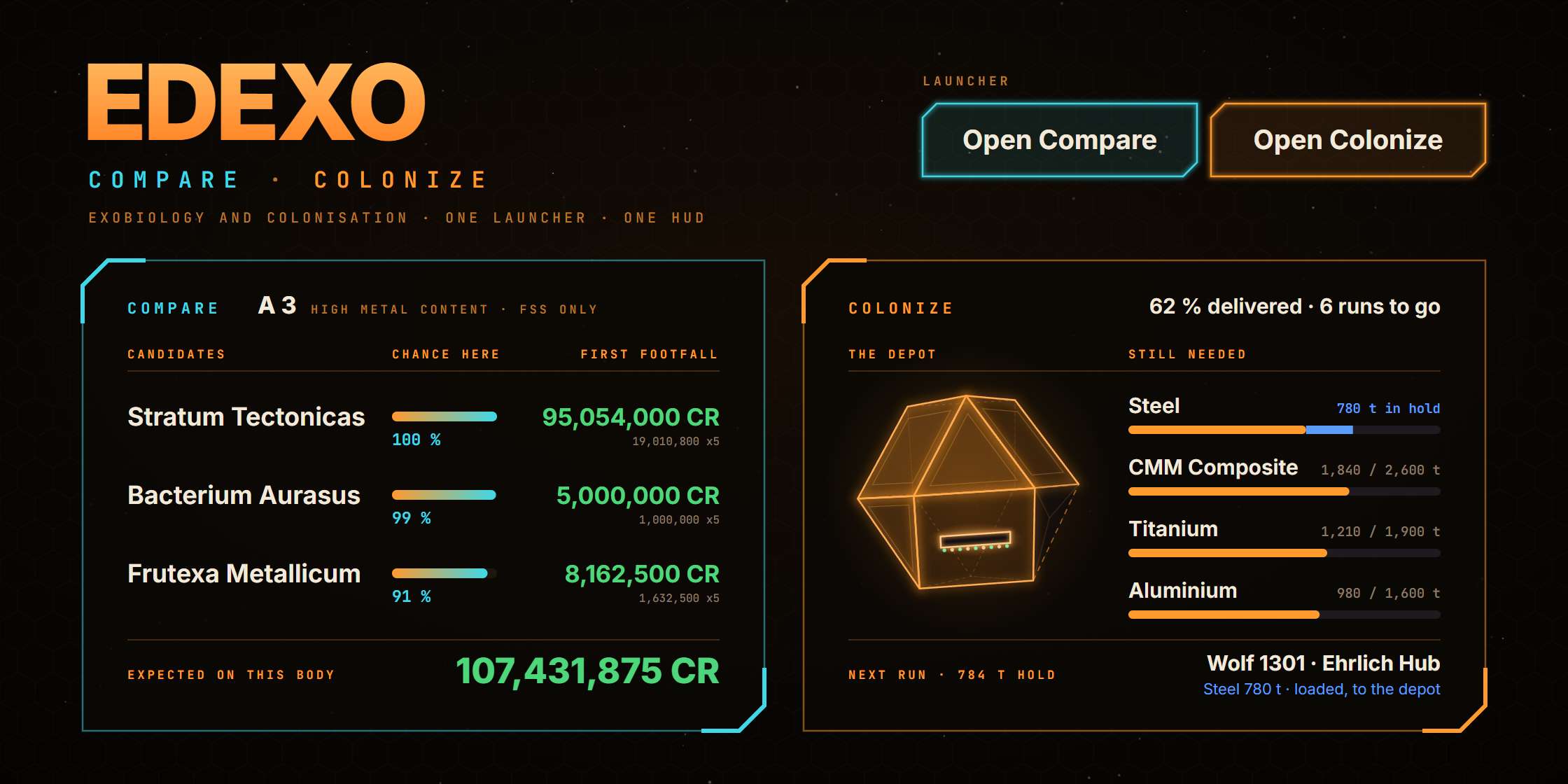
Companion apps for Elite Dangerous, formerly EDEXO-Compare. Both read the game’s own journal files and merge every log into one picture of the galaxy you have visited. Compare, the exobiology app, narrows the codex down to the species that can actually live on any body with a biological signal - before you have landed, and usually before you have mapped it. Colonize, new in 1.3.0, follows your construction sites and plans where to buy what they need and how to haul it.
Made by CMDR FALrenica. Not affiliated with Frontier Developments.
Species guideThe numbers behind every predictionOpen the values EDEXO predicts with: every species it knows, where each one was actually found, and mode-value charts for temperature, gravity, pressure and distance. Paste a body's scan and the app's own engine predicts what grows there. Updated with every release.25 genera126 species114,461 sightings chartedWhat it tells you
Which body to fly to. Every body in the system is ranked by expected value: the chance of each species being present, times its payout, times the first-footfall multiplier, set against how many minutes on the ground it will cost. Both timings come from your own journal - approach and landing, and one sampling run per genus - so the minutes are measured, not guessed.
How likely each species is. The chance shown is a calibrated probability, not a resemblance score. It is built from how often a species has actually been recorded at this gravity, temperature, pressure, planet class, atmosphere and host star, weighted by how common the species is, and normalised across the body’s candidates. On bodies where every genus was sampled, rows the app calls 90-100 % turn up 97.8 % of the time. Why this chance under a species charts the bodies it was confirmed on, with this one marked, and ends with how often rows at that chance came true on a year of other commanders’ finds - “rows said 35-50 % came true 44 % of the time”. Beside the price range sits what the body is likely worth, and where most of that rests on one species that is less likely than not, a DSS first tag says a probe would settle it before you land.
Nothing left out. A species is hidden behind show unlikely only below a 1 % chance, and never if you have scanned it yourself. The rule is no misses first: a list of three where one is right beats a list of one that is wrong. Checked against other commanders’ finds on EDDN, after a surface scan 6,599 of 6,599 species were listed.
Which species, once you have mapped it. After a surface scan names the genus, the same probability renormalises inside that genus to say which of its species you are looking at.
What you have not logged before. A badge marks species new to your codex, [CODEX FIRST] marks a colour nobody has logged in that region yet, as far as EDSM’s and EDAstro’s codex records know, and [RARE] a colour logged in ten systems or fewer in the whole galaxy. On the galaxy map, a region lists what other commanders have logged there that your codex lacks, rarest first, and flies to the nearest system in that region that has it. First footfalls are tracked because they are worth five times the base payout.
Where it was wrong. Every species you find that the app failed to offer is written to a local miss log. That log is read, not just recorded: it is the reason recall went from 93.2 % to 97.1 %.
On a second screen. A read-only triage view opens on a phone or tablet and updates as you jump, and the HUD opens there too.
On stream. A streamer view shows the app with every control taken away, for a browser source in OBS. Options on the link hide your commander name, scale the page, or drop the backdrop so it sits over the game.
Over the game. Ten click-through HUD sections sit at the edge of the screen: the exo-distance tracker, whose radar rings every sample at the genus’s minimum distance, the discovery scan count, the candidates for the targeted body, unsold data value, the next jump, notable bodies, notices, a tracked achievement, Colonize’s next stop, and your ship’s damage part by part when something is hurt. Stack them or merge them into one panel, in the original look, a title bar or an Elite-style frame, in any colour, at 50 to 200 % scale.
Where the predictions come from
Two sources, and the app tells them apart. The codex rows say where a species should grow. A corpus of 114,461 confirmed sightings says where it has grown. Where they disagree on a species the corpus has seen enough times, observation wins - for host star, planet class, temperature, volcanism, gravity and atmosphere. Each of those six thresholds was swept against the app’s own accuracy probe before it shipped, and no number reaches the screen as a percentage unless the probe has calibrated it.
The corpus is built from Spansh’s Exomastery data - what started the project as a solo effort and has driven it from day one - and from organic scans collected off the EDDN live stream, hydrated against EDSM body records, with species photographs contributed by commanders, each labelled with who took it, with some from the ED-DSN network standing in until they are replaced. Full attribution is in the repository’s notice file.
What the corpus measured for every species - temperature, gravity, pressure, body class, atmosphere, host star - is charted in the species guide, next to the published conditions.
Local-first
Everything runs on your machine. The app reads files that are already on disk and serves a page on localhost; there is no telemetry, no analytics and no crash reporting.
Three requests run without a switch, and none carries anything about you: the update check (GitHub’s list of this project’s releases, at most once an hour), the game server status, and EDSM’s answer to which systems on your plotted route it already knows - the system names only. Others happen only when you ask: a system search on Spansh, EDAstro’s carrier and point-of-interest lists (which, once fetched, can refresh themselves every few hours, as can the stations), Find Tritium’s question to Spansh, EDSM’s answer about the systems you pick in NavRoute, the galaxy map’s index, stations and neutron stars from this project’s releases, the browser’s filter lists from their publishers once you open it, and your public address when you click to see it.
Colonize asks Spansh for sellers of what your sites still need while its plan is open - commodity names and your site’s system, nothing about you - and a switch turns that off. Your wing’s cargo comes from EDSM only when you ask or switch it on, and Inara is never contacted by the app: its pages open in the browser when you click, and are read only when you press Read.
Sending anything about you is off by default, each switch on its own: looking systems up on EDSM and sending your journal there (both with your own EDSM API key), your discoveries to Canonn Research, and your live events to EDDN, the community data network. Turned on, they carry your commander name, because those archives are keyed on it. The privacy policy that ships with the app lists every request, with when and what.
Server mode exists so the app can sit on a second monitor or a tablet. Because that makes it reachable from the local network, every device other than the PC it runs on must present an access key that is minted on first launch and stored beside your settings.
Measuring it
Accuracy is a measurement, not an opinion. The repository ships the probes that produce every figure above - recall, precision, mean rank, top-1 and top-3, calibration buckets - and they run against your own journal cache in both scenarios, FSS-only and after mapping, because a number for one of them alone does not count. The one to watch is the missing gate: bodies where the app offers fewer candidates than the game itself reports signals. It needs no ground truth to prove, and it stays at zero.
Where in the galaxy
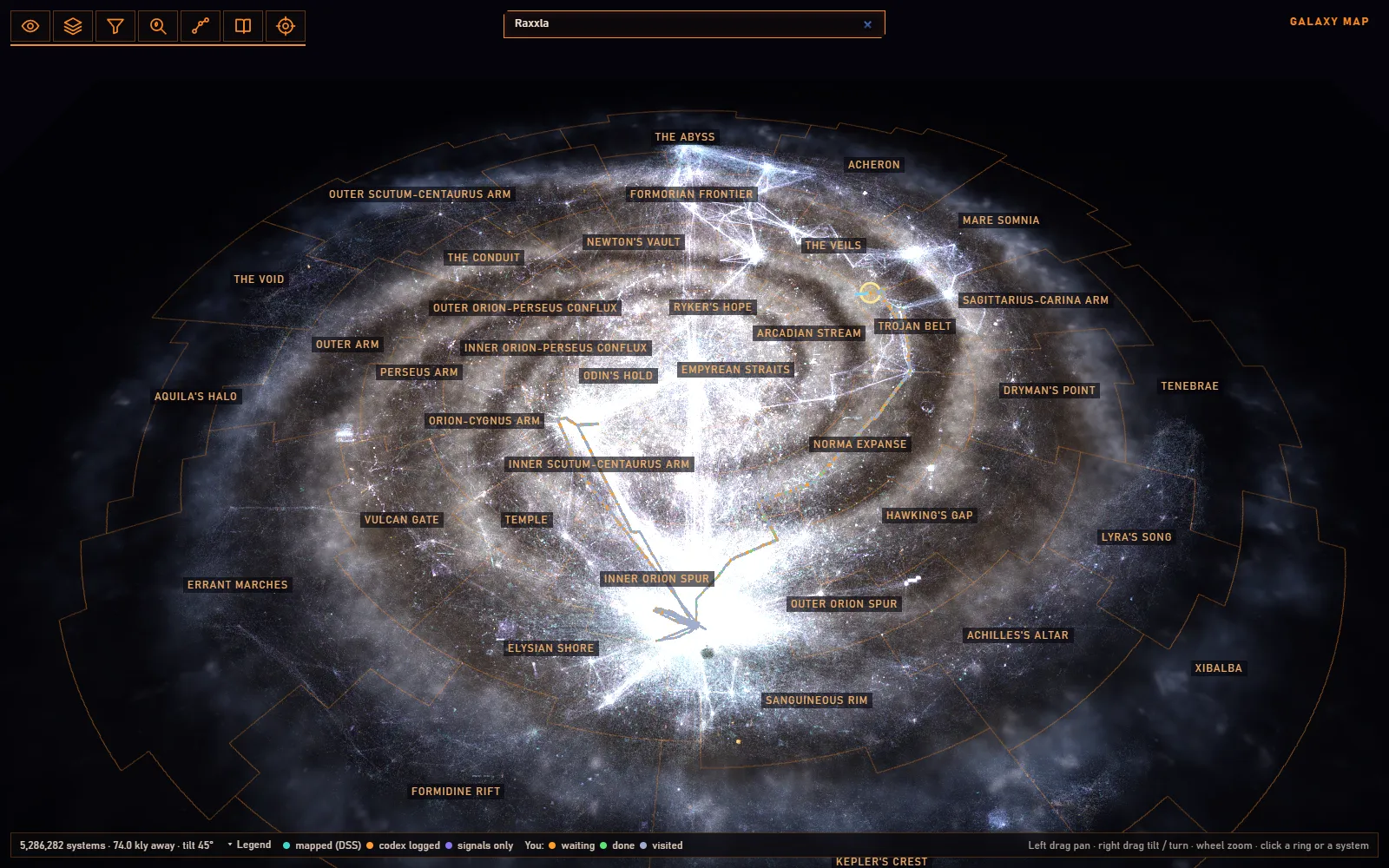
The other question, asked against the whole galaxy rather than the body in front of you: where is the nearest system worth flying to? The galaxy map draws all 5.3 million systems with recorded biology in 3D, grouped by region, sector and neighbourhood, with your own systems on top. Set a floor and Next target names the nearest one above it that you have not mapped or sampled, and copies its name for the game’s galaxy map; Plan adds up to twenty more and visits them in the shortest order it finds, back to where you started if you ask. A filter lights up the systems with a chosen species, genus, star or planet type, and NavRoute keeps every route you plot in the game, with each system’s star class, for finding neutron stars, Wolf-Rayets and black holes along it.
Values there test the plain list price and never the first-footfall multiple - a commander typing 19 M means Stratum Tectonicas, not a 3.8 M plant that happens to reach 19 M at x5. These are recorded sightings, not predictions: somebody logged that species in that system, which is a different claim from the app’s own estimates, and the two are never blended into one list.
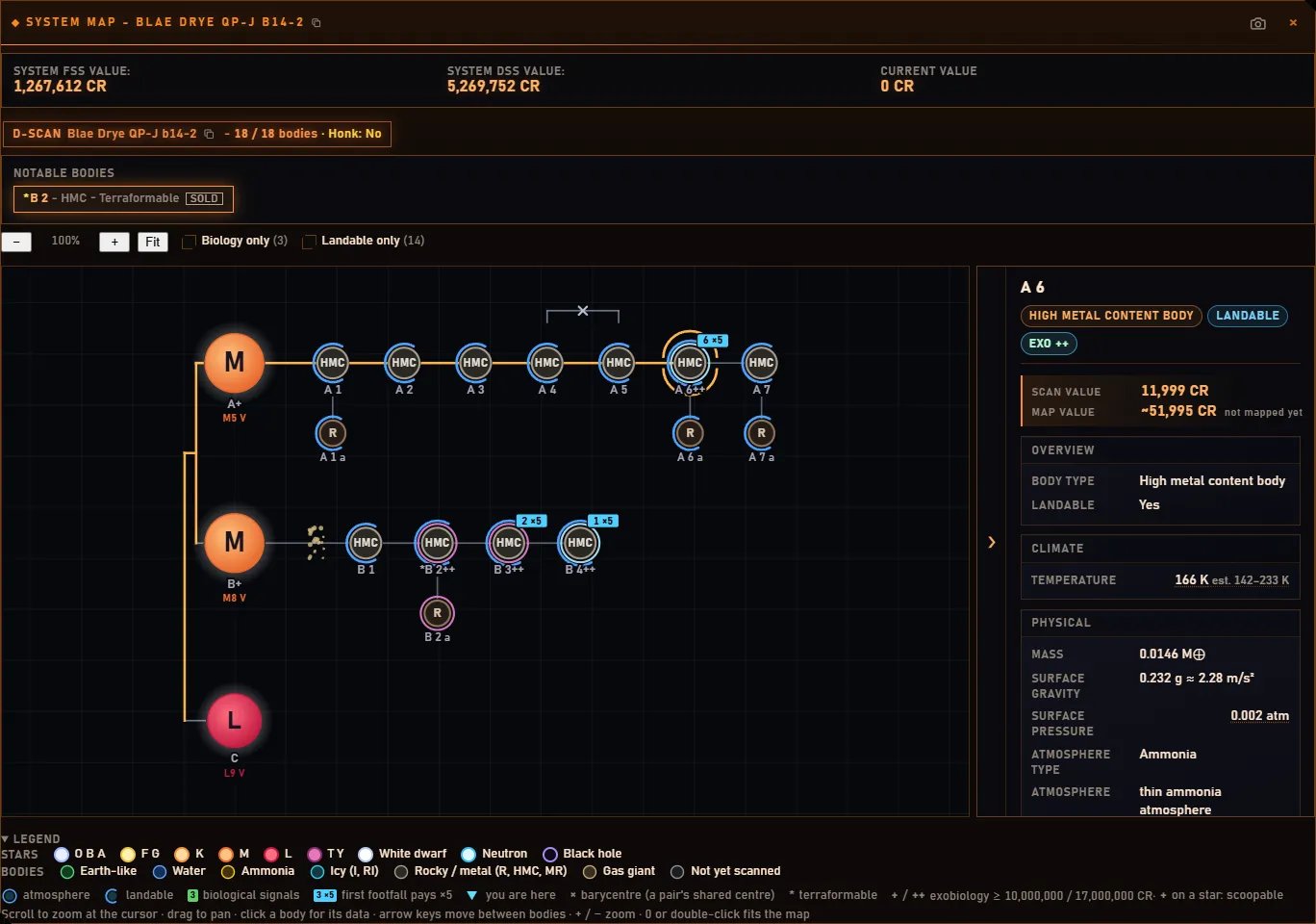
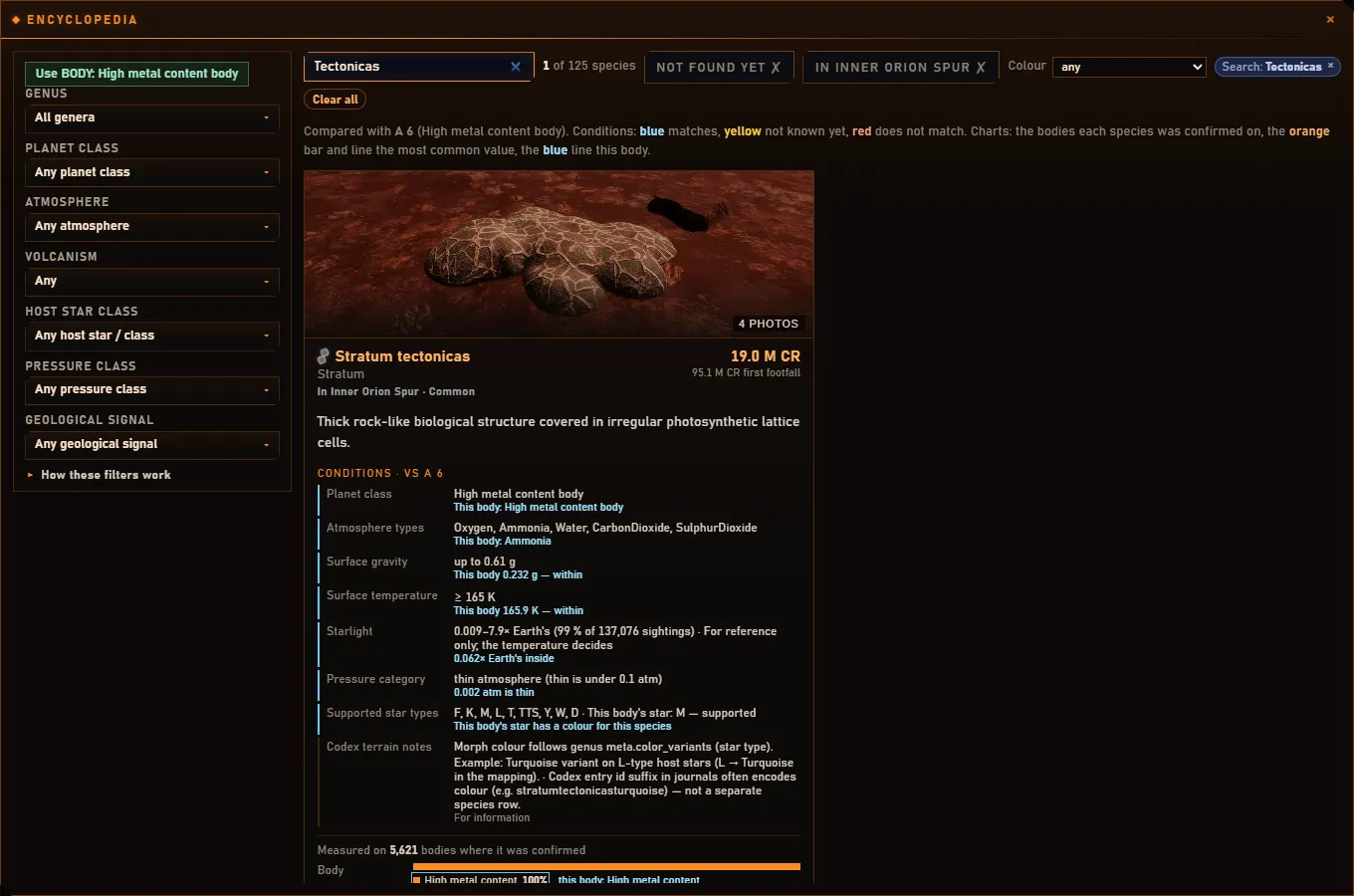
Alongside it, a system map draws every body by class with orbit lines, rings and moons, marks the terraformable ones and the exobiology worth chasing, and can be trimmed to biology only; an encyclopedia of every species checks its conditions against the body you are at and colours each card by whether the body satisfies it; and a discoveries table lists every body, system and star in your journals with its estimated value, filterable down to your first discoveries and first footfalls.
Expeditions
The galaxy map also plans where to go for first footfalls nobody has claimed. Expedition scores every boxel round you - or along a route to any system you name, or to one of eight it suggests round you - by the credits its unflown systems should pay per jump: how many systems a boxel of its size holds there, how often they carry biology, which genera grow in the region and what they pay at five times. Systems you have visited, systems with recorded biology, and the 4.2 million flown since 2025 and found barren are taken off, so a boxel the bubble’s traffic has already emptied does not look full.
It can look for other things too: Earth-likes, water and ammonia worlds, helium-rich gas giants or boxels dense with gas giants, a main star type, or systems worth 5 to 50 million to whoever scans them first. A boxel’s card lists the system names nobody has recorded, ready to copy into the game; a plan puts up to twenty boxels in flying order; a species lights only the boxels its position rule allows, with the rule ringed on the map. The best boxel within 500 ly sits in the header and, if you want it, on the jump HUD.
Measured on my own flying: on 153 boxels where I visited three or more systems, the planner’s top quarter held 2.0 biological signals and 5.9 million credits of species per system, its bottom quarter 0.4 and 2.8 million.
Routes and stations
Getting there is the other half of an expedition. The galaxy map’s Neutron tab plans a route through two or more stops by supercharged jumps from neutron star to neutron star, over 3.5 million of them, with a refuel stop wherever the tank would run low, at a neutron star with a scoopable star close by. It takes your jump range and tank from your journals, can put the stops in the shortest order, and counts the FSD wear each supercharge costs - learned for each of your ships, since they do not all wear the same. The supercharge itself is read from the drive the game reports: six times the range with the Mk II SCO drive, the Caspian Explorer’s, in whatever ship carries it, four with any other. From Sol to Colonia at 60 ly it is 120 jumps instead of 367.
Then fly it: after each jump onto a stop the next one goes on the clipboard for the game’s galaxy map, the HUD says where to scoop and where to supercharge, the header warns when the FSD drops under 80 %, and leaving the route plots it again from where the ship is. Stop clears it everywhere.
The map also has 800,709 stations, outposts, settlements and colony sites in 137,330 systems, with their pads and services. Find knows their names, and the Carriers & Stations drawer answers the question an expedition keeps asking: where is the nearest station with repair, Universal Cartographics, Vista Genomics, Interstellar Factors or a material trader, with a pad my ship fits - or the nearest carrier with the services you want. Its Find Tritium tab, for carrier owners, names the nearest rings with Tritium hotspots and the stations and carriers that sold it in the last 30 days. Your own fleet carrier and colonies are marked on the map, and your stations are in gold. If your journals are gone after a reinstall, the game’s own list of the systems you visited can be imported, so the map and the planner still know where you have been.
For the gaps no neutron star bridges there is jumponium, the raw materials of the FSD injection. The app follows what you hold from your journals - the list the game writes at each login, then every pick-up, trade and synthesis after it, which matched the game’s own count on all 411 of my logins - and says how many basic, standard and premium injections that makes. A scanned body rich in one you are short of is announced, the body tab lists what is in its crust, and the galaxy map’s Jumponium tab finds the nearest rich bodies by element, gravity and distance from arrival. One thing the data settled: on 4.2 million landable bodies, not one carries all five premium elements, so a premium injection always takes two stops. The same Laboratory tab keeps the AFM refill materials, for the ammunition of the unit that repairs the ship - and the FSD - in flight.
Colonize
The second app in EDEXO, with its own button in the launcher, follows your colonisation from the journal. Every construction site you docked at or delivered to is there - read once from your whole journal history, so a site from weeks ago is not missing - with what each one still needs, whether it is in a system you claimed or one you are helping build, and your colonies with what was built in each.
A haul plan for your hold. Colonize works out where to buy what your sites need and packs it into trips the size of your hold, by fewest stops, nearest or cheapest: the next trip stop by stop, the rest as cards. There is nothing to tick - a purchase is done when the cargo is aboard, a trip when the site records the delivery. Each site is a card with what is left, what is in your hold and its own rules (pad size, distance from the star, planet ports, carriers), and the plan follows the strictest. Credits by week shows what each system paid you and what the goods cost.
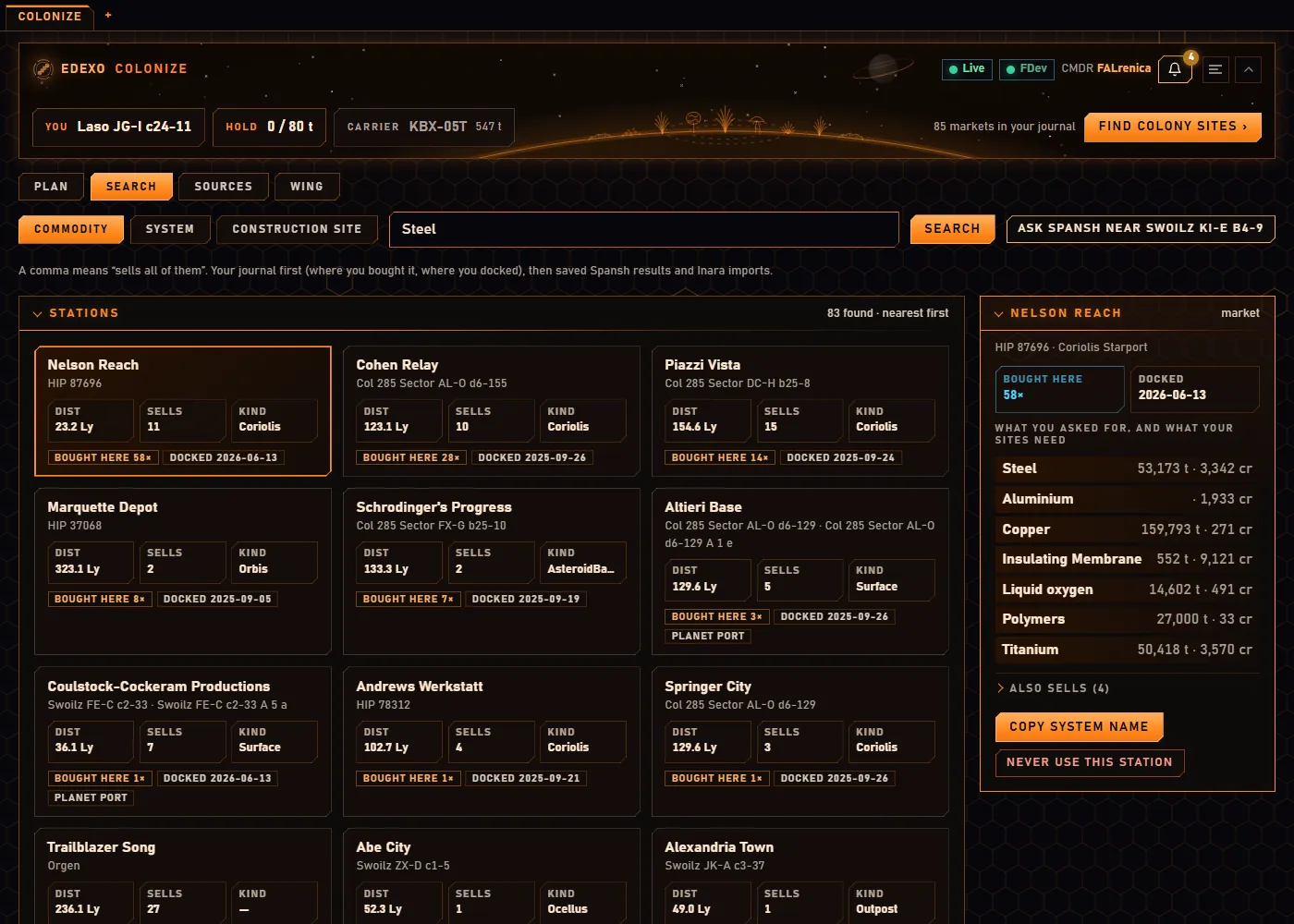
Sellers from your own journal first. Search starts with the markets you docked at and bought from, then Spansh - whole markets at a time - and Inara, which opens in EDEXO’s own browser, where a pop-up reads the sellers on the page into Colonize when you press Read. Your fleet carrier counts as already-bought cargo when you switch it on, a trade party follows friends’ carriers, and the wing view splits who hauls what.
The same app around it. Colonize looks and works like Compare, with the galaxy map and the other screens as tabs - tabs drag between the two apps’ windows - a HUD section with the next stop and this week’s credits, a read-only view for a phone, and a streamer view for OBS.
Colonisation candidates
The same map answers a colonist’s question: which systems near my colonies are worth claiming? The Colonisation candidate search takes the 6.7 million systems within 150 ly of inhabited space, from Spansh’s dump, and keeps those within 15 to 150 ly of your own colonies, of a system you pick, or of any of the 132,580 colonised systems in the galaxy - with at least as many of what you ask for: Earth-like, water or ammonia worlds, gas giants by class, rocky or icy bodies, rings, landable bodies with or without an atmosphere, terraformable ones, biology or geology signals, and the main star or a black hole, neutron star, white dwarf or giant among its stars. Systems already colonised or claimed are left out unless you want them, the list is nearest first or richest first, and every hit is on the map with its card.
The counts are the bodies Spansh lists, so each is a floor; Fully scanned only keeps the systems whose every body is listed. Its data is its own download (150 MB) from inside the tab, and a search round every colonised system takes a few seconds, in a thread of its own so the rest of the app carries on.
A browser in a tab
Elite runs on a lot of websites - EDSM, EDAstro, Spansh, Inara, ED GGG, ED-DSN - so the desktop app has a small browser of its own in a tab. It is private by default: nothing a site stores outlives the app unless you tell it to remember that site, and every permission a page asks for is refused except fullscreen. Ads, trackers and cookie notices are blocked with EasyList, EasyPrivacy and uBlock Origin’s lists, YouTube’s ads too, the way uBlock Origin Lite does it. The lists come from their publishers when you first open it; nothing about what you browse comes back to me. One browser serves both apps: Colonize’s Inara links open in it, with the pop-up that reads a page into Colonize when you ask.
Everything else
Screens, as tabs you can drag into windows of their own or across to the other app: Unfinished business, Boxels (your saved boxels, a Spansh look-up, golden boxels, a boxel run on F6 to F9), Statistics (ranks, records, carrier upkeep, and how good the predictions have been on your own bodies), Achievements by region and colour, bookmarks with tags and notes, green gas giants by CMDR Arcanic’s ladder, and a session log.
Launcher and options. Notices with or without sound (Community Goals among them, from Frontier’s public list), key binds that only work while the game or the app is in front, backups that warn when they share a drive with your journals, the import of the game’s visited-systems list, a Motion setting, a list of old backup copies to clear, and a What’s new after each update.
Running it
The Windows build is a program folder as a .zip - unpack it anywhere and run it, no installer - and there is a single portable .exe on the releases page if you would rather have one file; it shows a splash while it unpacks the first time and starts straight away after that. Either way it is a small launcher window with a button for each app, Compare and Colonize, each opening in a window of its own or in your browser as you choose, with a command-line variant for servers. It checks for a new release and, when you press Download & Install, replaces itself and restarts with your settings where they were. The galaxy map’s index (about 255 MB), its stations (16 MB), the neutron stars (40 MB) and the Laboratory bodies are one separate download, offered the first time you open the map; the colonisation candidate search’s data (150 MB) is fetched from its own tab. On Linux, if the graphics driver takes the app down at start, it switches to safe graphics by itself and starts again. Node 22 or newer if you run it from source. Point it at your journal folder if it is not in the default location, and everything else is on by default.
From 1.3.0 the code is under the PolyForm Noncommercial License 1.0.0, with two permissions of my own. Use it, change it, fork it and build it for anything non-commercial, keeping its notice line; selling it, or any part of it, is not allowed. Streamers and video makers may show the app and its HUD in monetised content with no licence step and no credit needed, and a non-commercial fork may take donations as long as nothing is put behind a payment. Releases up to 1.2.20 were MIT, and copies of them stay so. The data is CC BY-NC-SA 3.0 - credit the sources, no commercial use, share alike - because part of it is derived from EDAstro’s content, which carries that licence. The species photographs are covered by neither. Most were contributed by commanders - the author and others - who took them themselves and gave them to the project knowingly, and every photograph in the app is labelled with where it came from; the rest are the ED-DSN network’s, included with their agreement as temporary placeholders. Any rights holder can have theirs removed on request.
Gallery
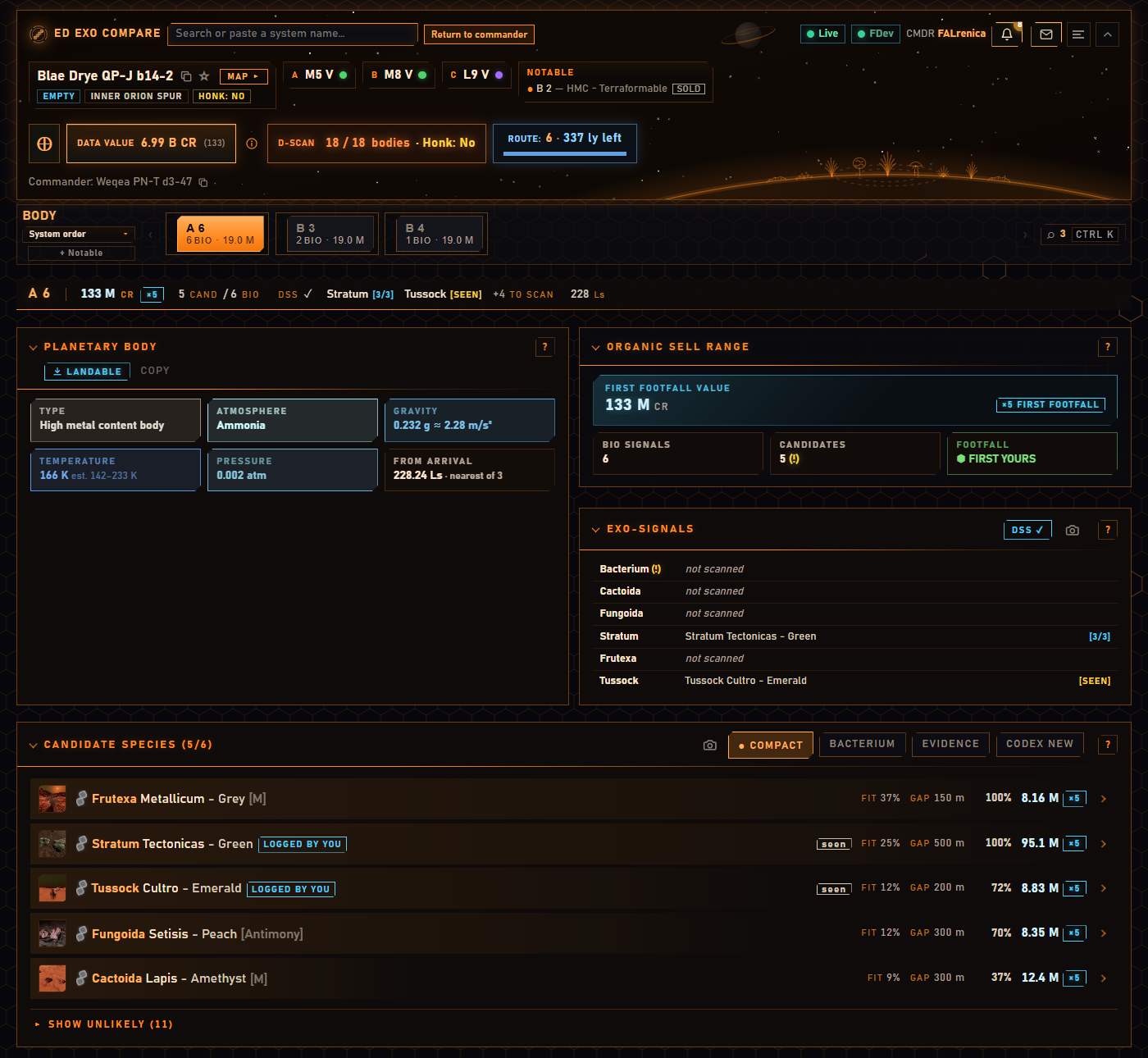
The main view, on a system I sampled and sold. A 6 has six signals; after the surface scan the app lists the genus each one turned out to be, and the five candidates still open - each with its chance, the sample gap and the payout at x5. Stratum Tectonicas was logged here, and the first footfall was mine.
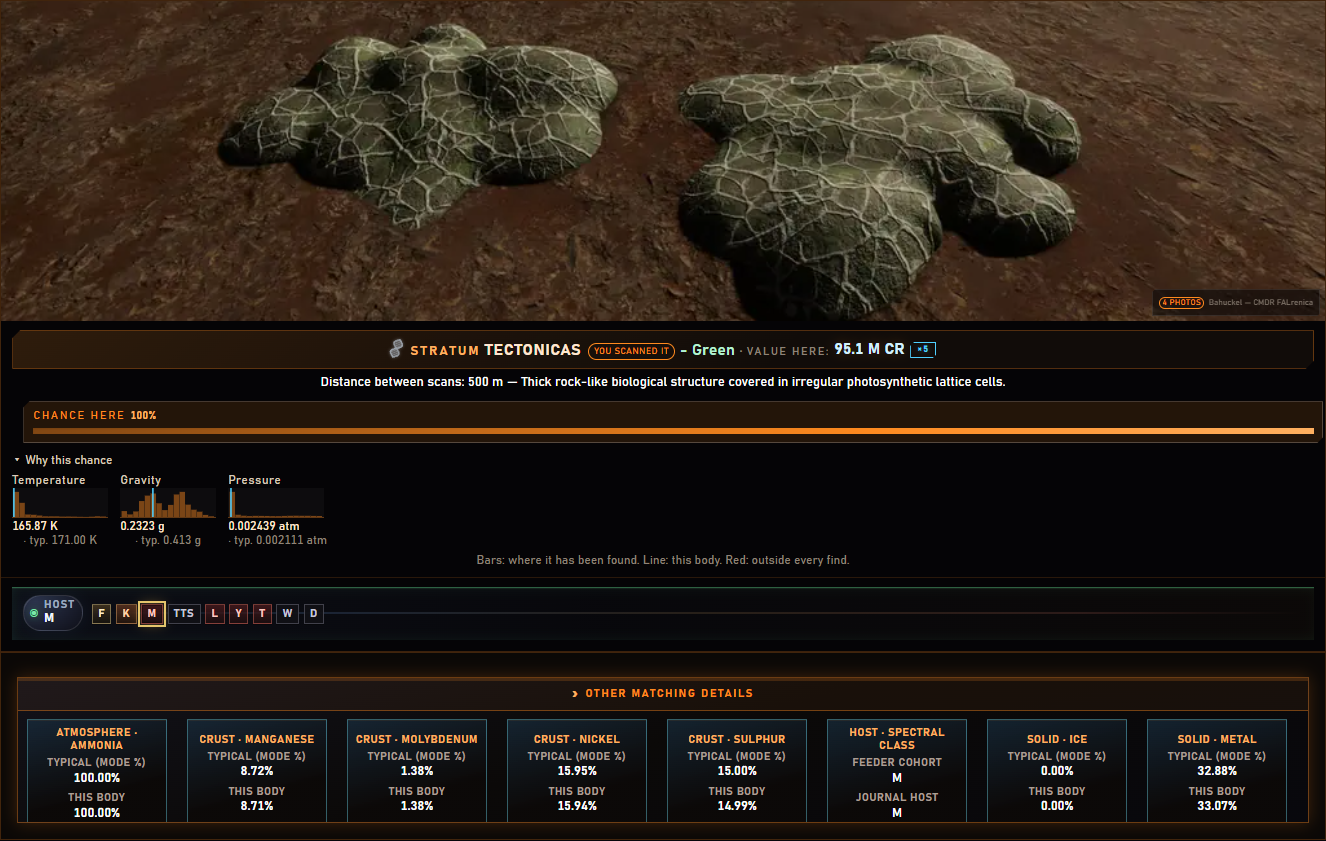
Why this chance. Under any species, the temperature, gravity and pressure of every body it has been confirmed on, with this one marked - here 166 K, 0.23 g and 0.002 atm, well inside what Stratum Tectonicas grows on.
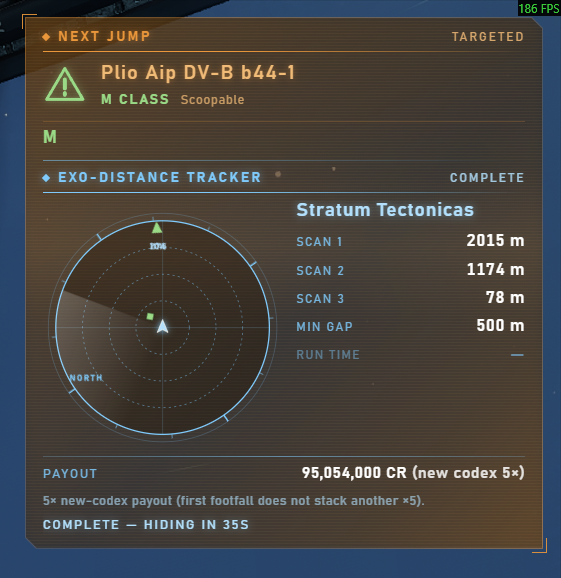
The HUD, drawn over the game. Click-through, so the ship still gets your mouse. This one stacks Next jump and the Exo-distance tracker - radar, the three sample distances against the genus's minimum gap, and the payout - and hides itself when the run is complete.
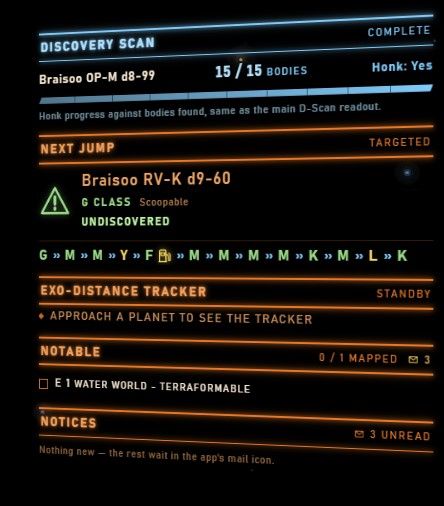
The same HUD in the Elite-style frame - two neon lines per section, here slanted. Discovery scan, next jump with the star classes along the route, the exo-distance tracker, notable bodies and notices.
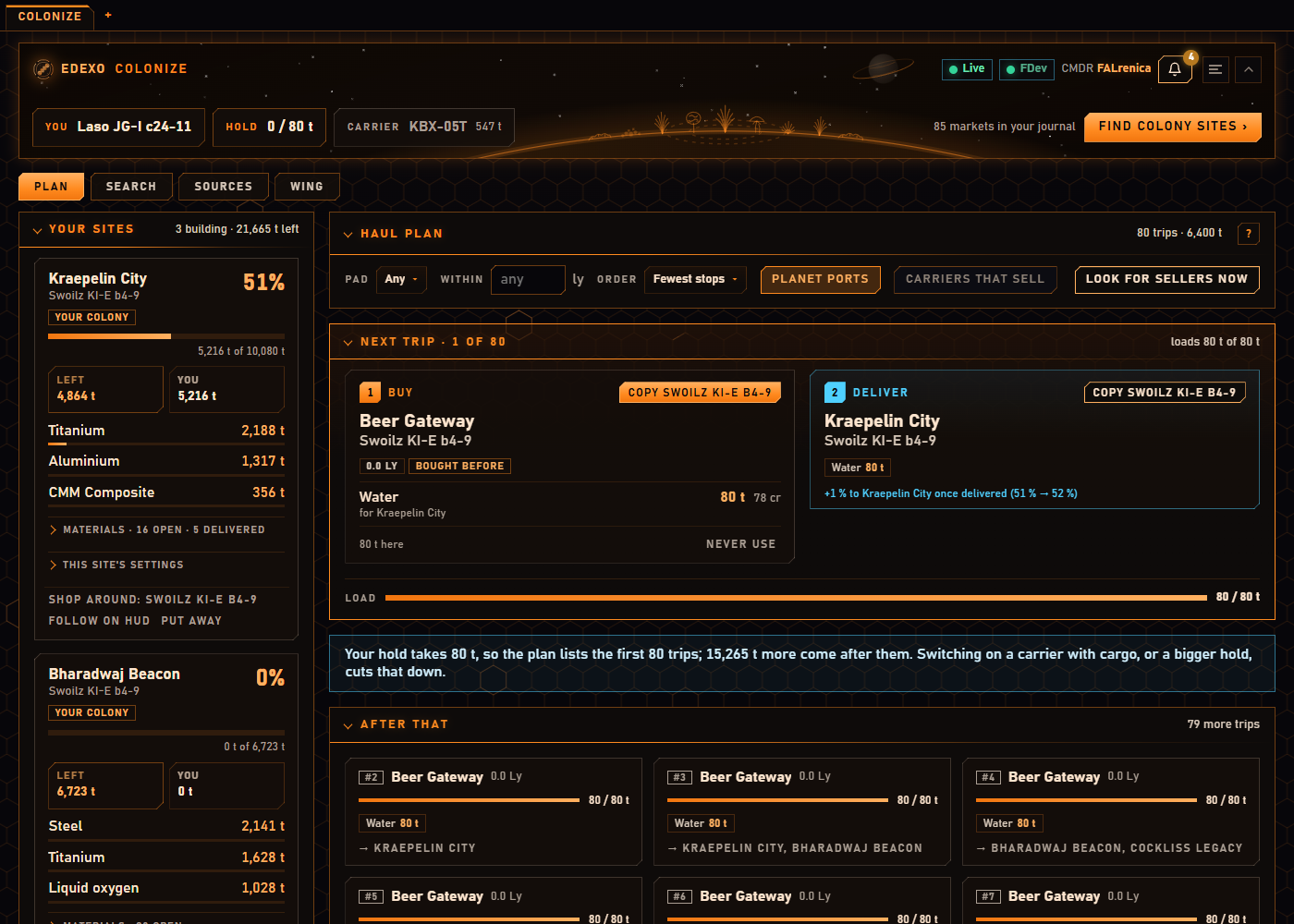
Colonize, the second app. My three sites in Swoilz on the left, each with what is left, what I hauled and its biggest needs; on the right the next trip, buy here, deliver there, and how far the site gets once it lands. Nothing to tick - the journal says when the cargo is aboard and when the site has it.
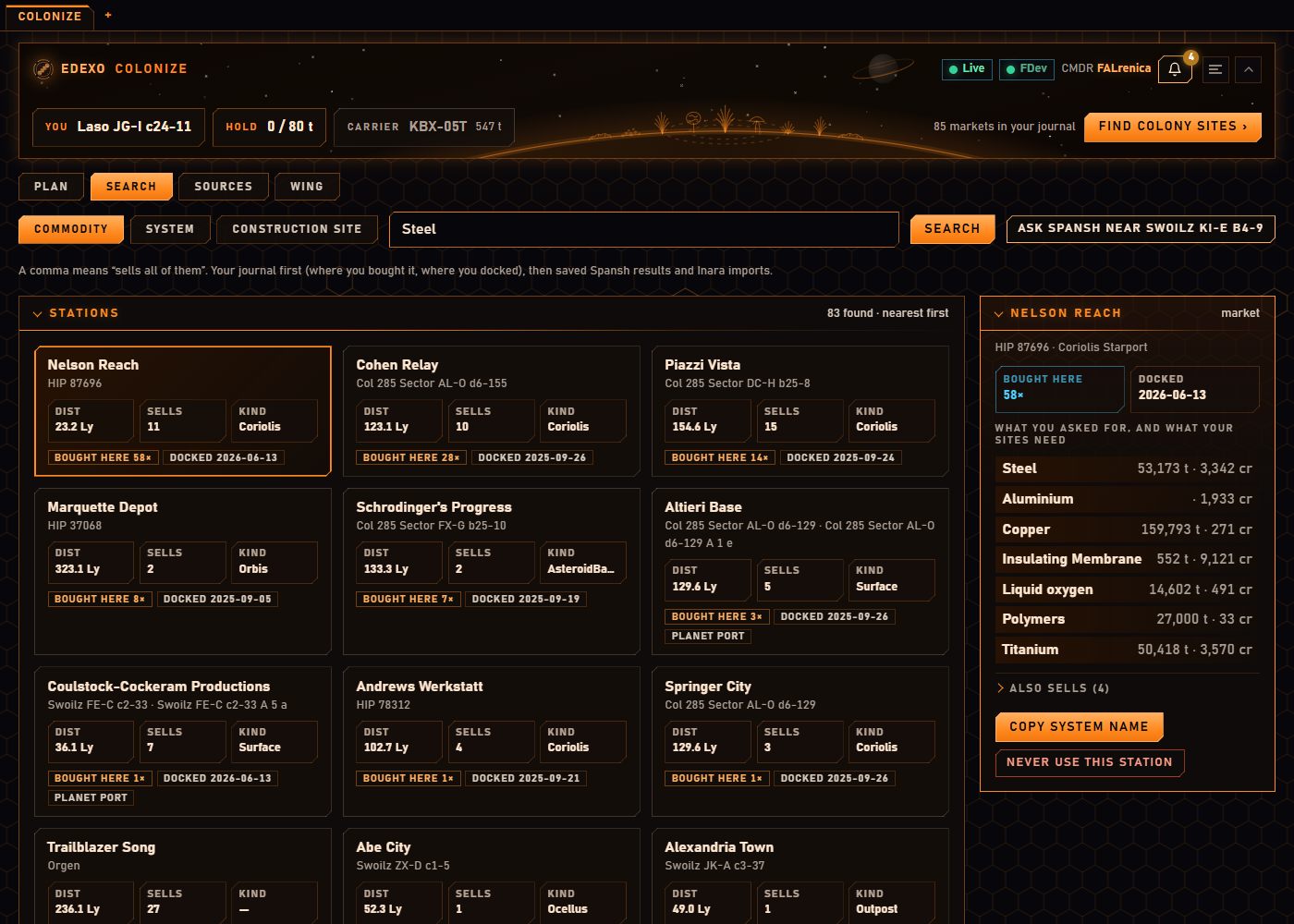
Search, starting from my own journal. Every station I bought at or docked at comes first, marked as such, then saved Spansh and Inara sellers; picking one shows its market beside the list, with what my sites need at the top.
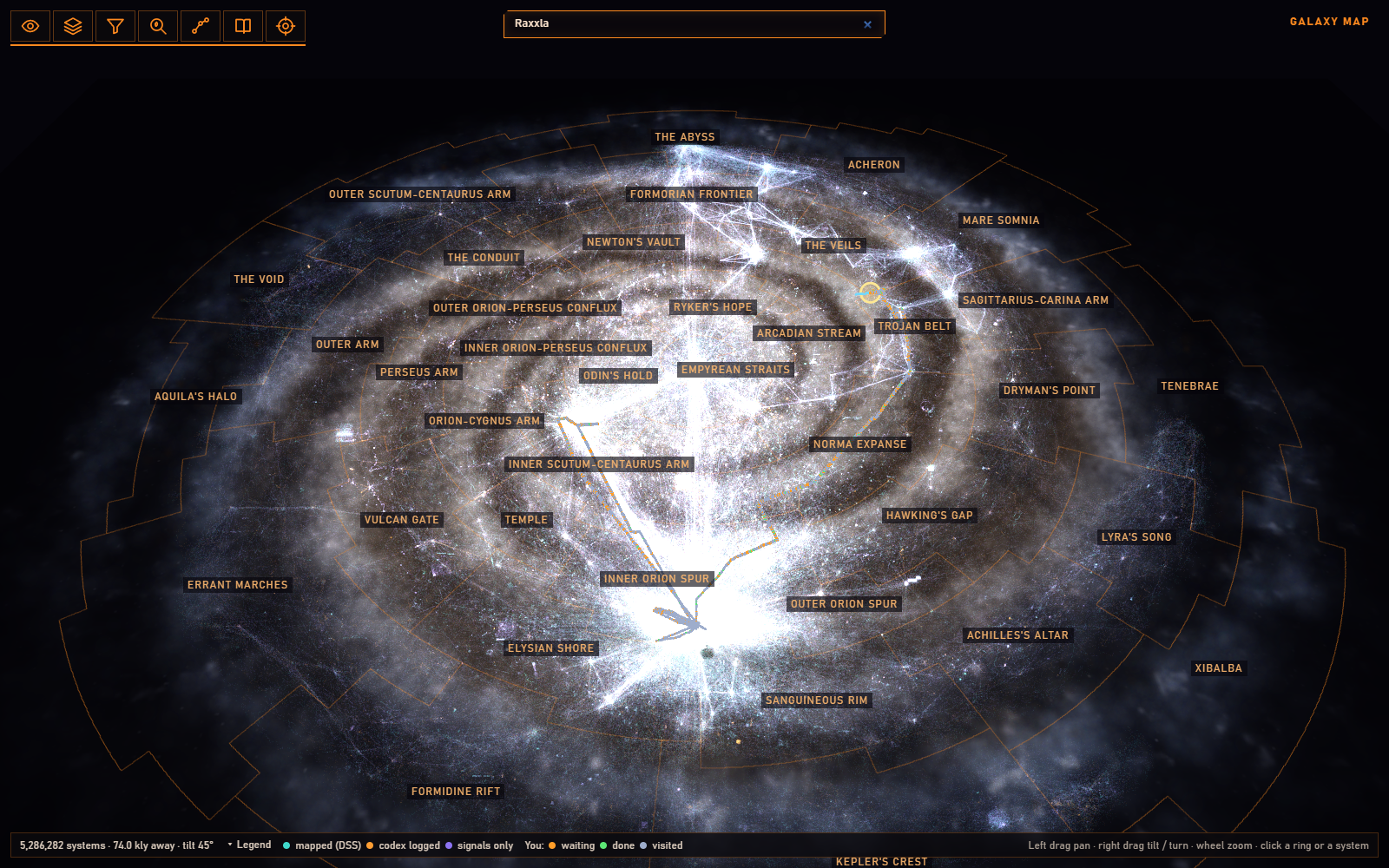
The galaxy map. All 5.3 million systems with recorded biology, in 3D, with your own route on top. Its menus open from the icons at the top left - the view, the layers, a filter by star, planet or plant, a species search, the stars on your plotted routes, your codex by region, and targets worth flying to for biology.
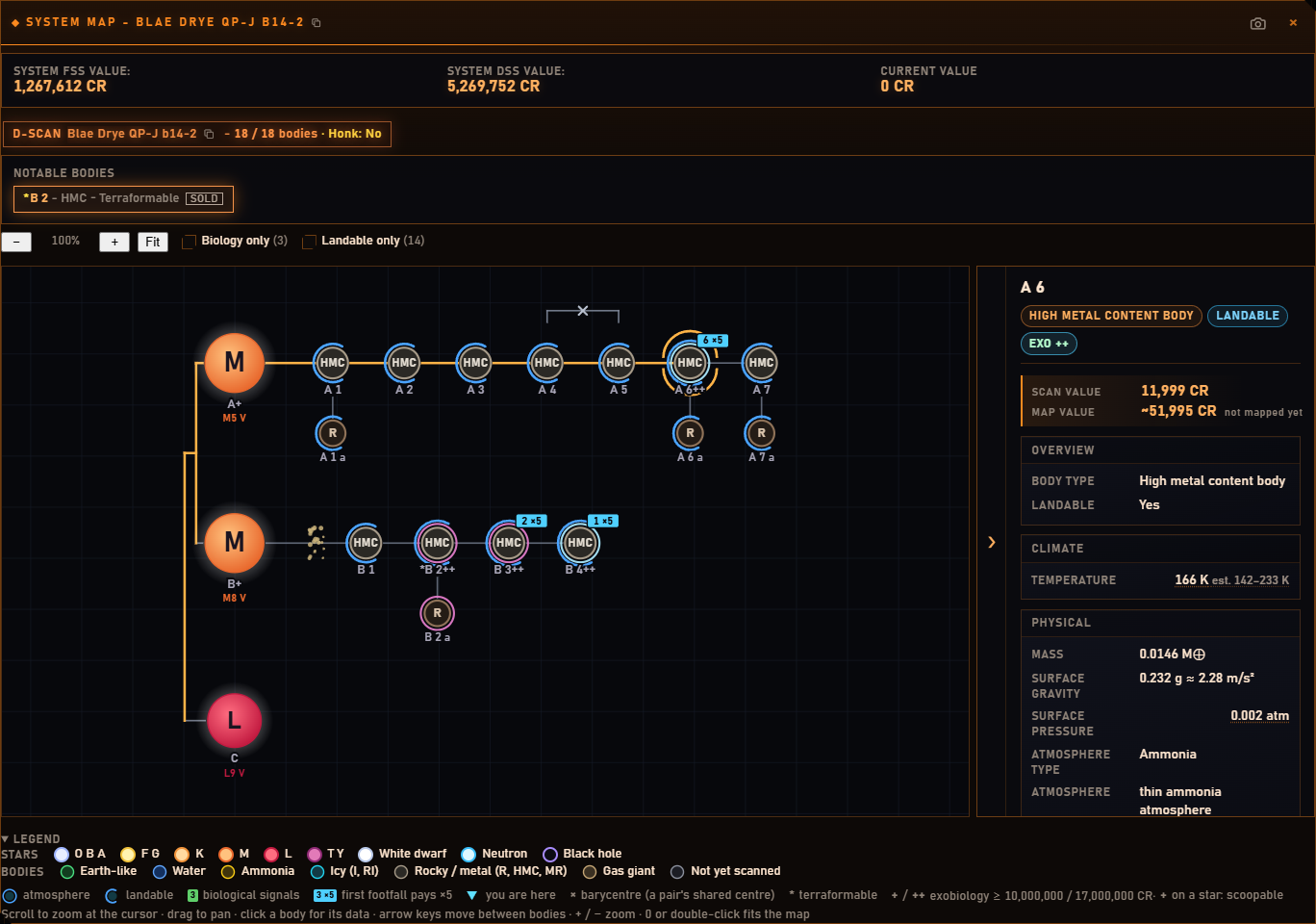
The system map of the same system. Every body by class with its moons, a badge where first footfall still pays x5, ++ where the biology is worth 17 million or more, and the selected body's facts beside it. Biology-only and landable-only trim it to what matters.
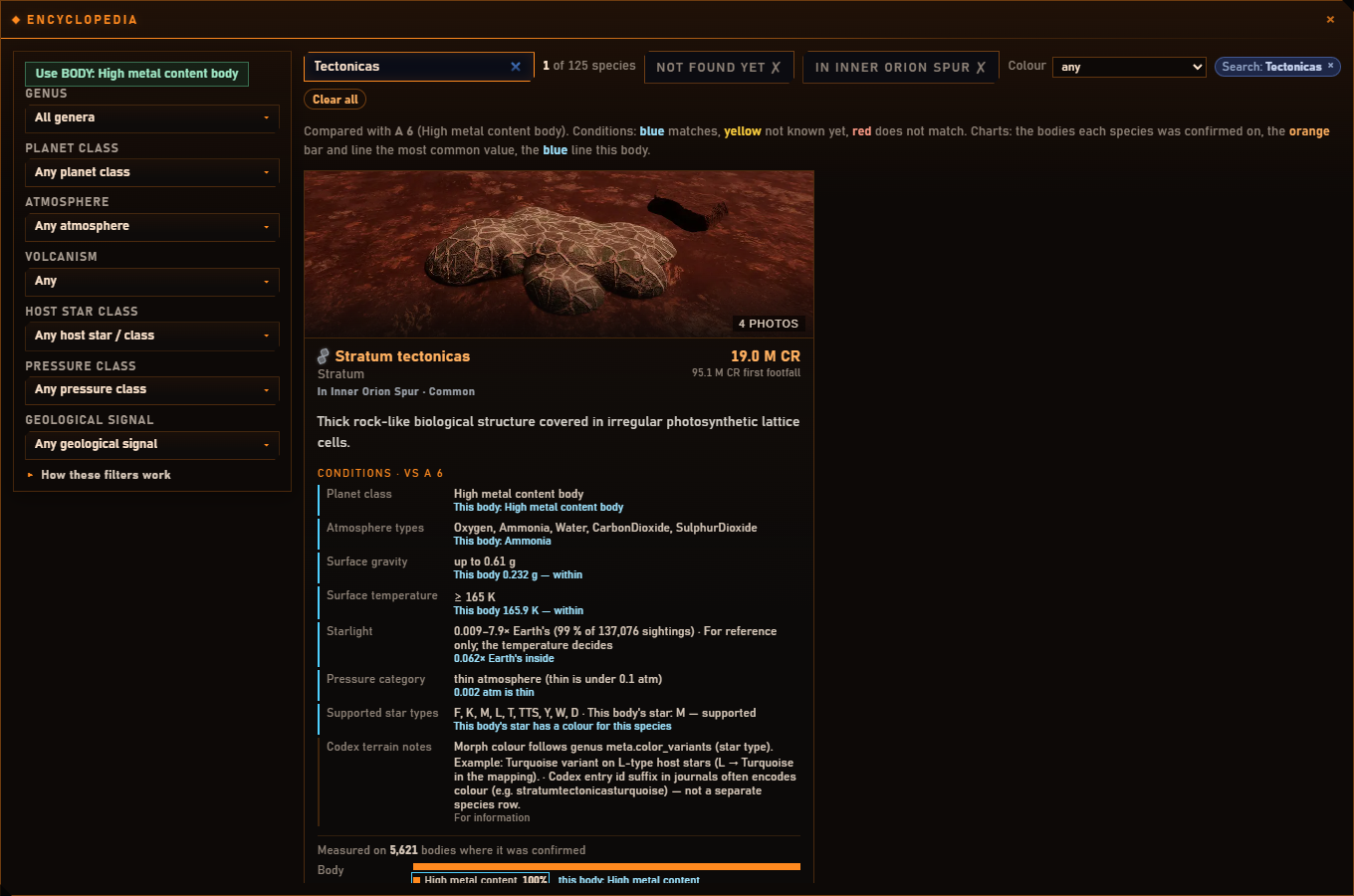
The encyclopedia, checked against the body you are at. Each condition of a species is set against this planet - blue where it matches, yellow where the telemetry is missing, red where a gate fails - so a wrong guess is visible before you land.
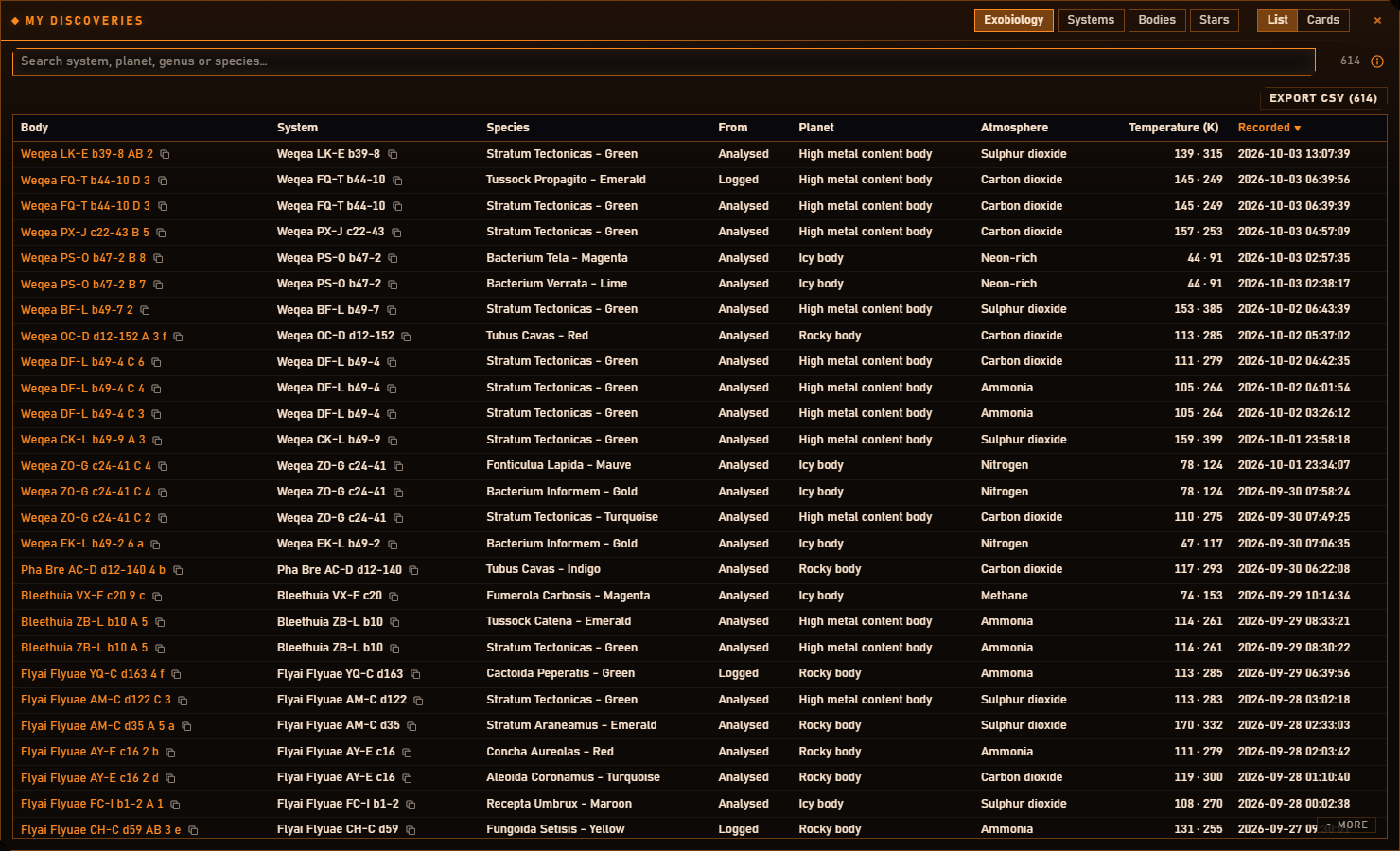
My discoveries. Every species you logged or analysed, and every body, system and star in your journals - searchable, sortable on any column, and exportable as CSV.
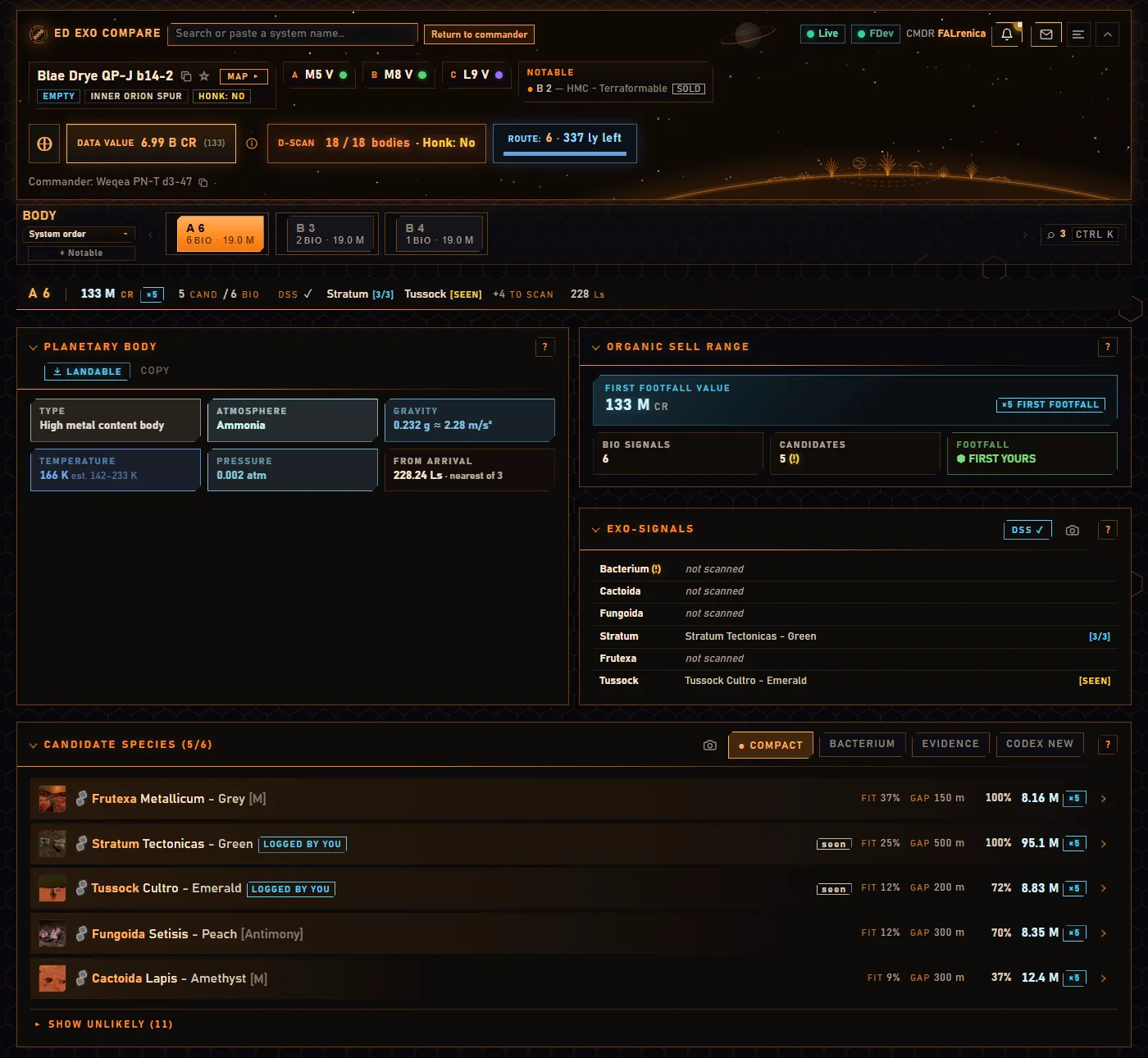
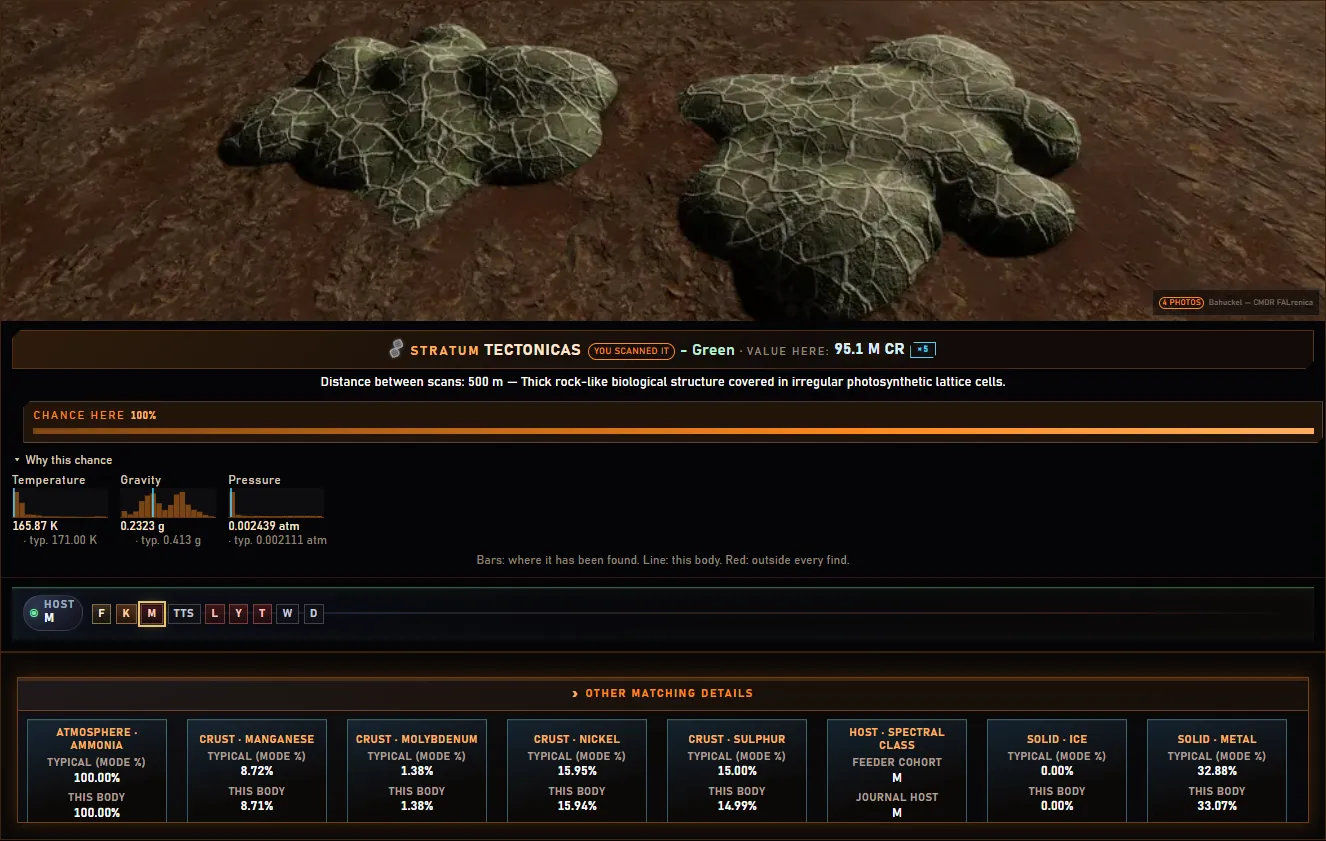
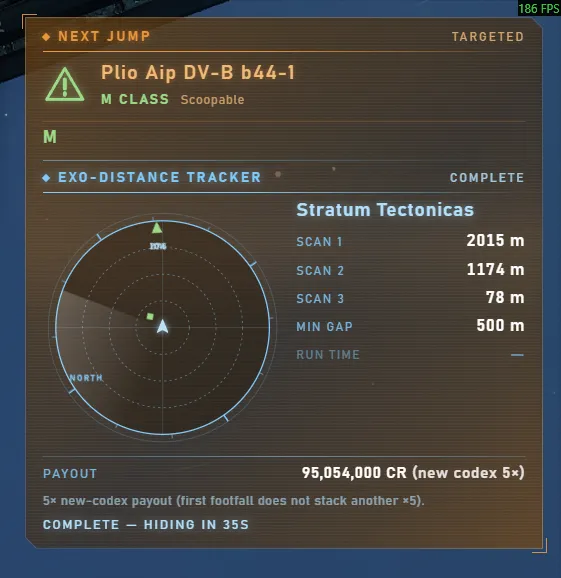
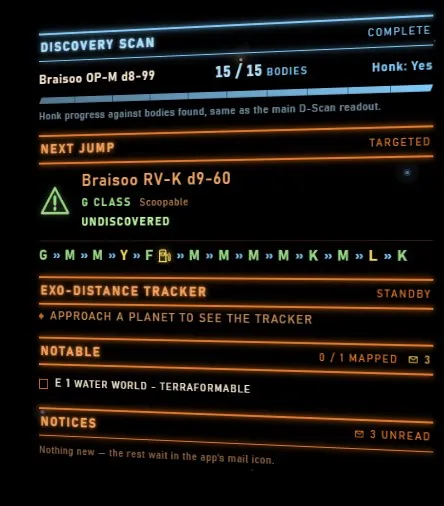
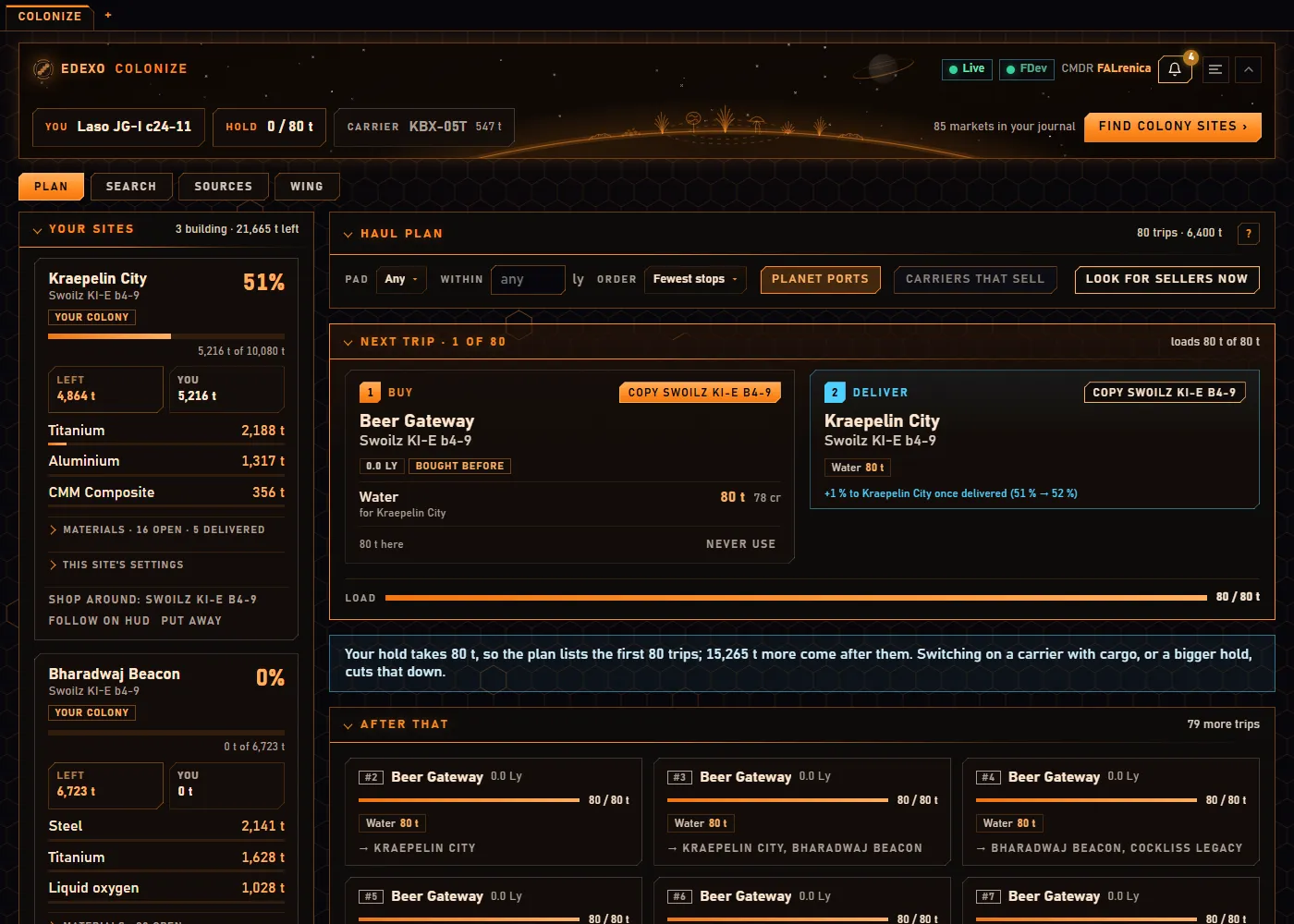
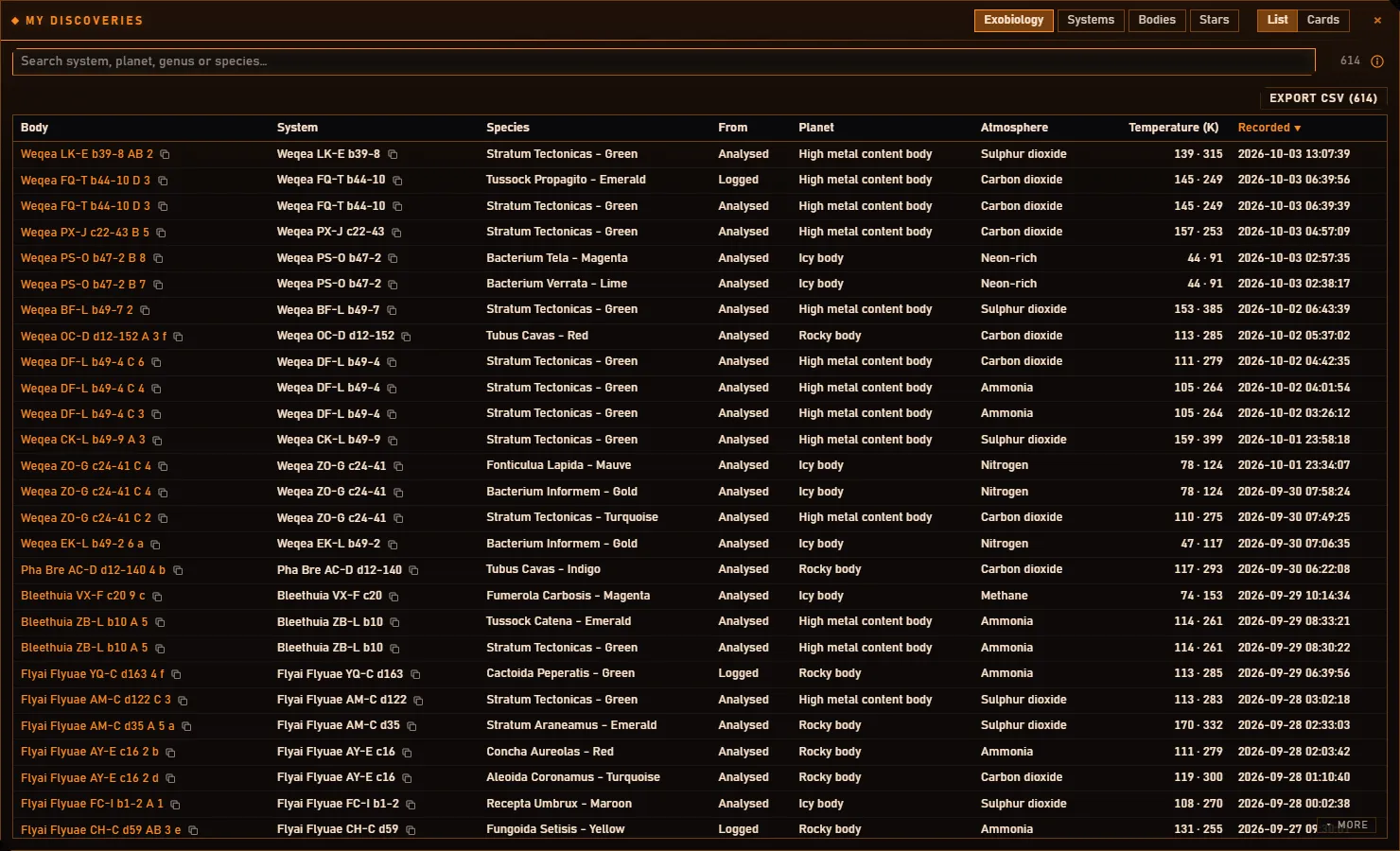
Screenshots of the app as it runs. Most of the species photographs inside it were contributed by commanders - the author and others who photographed a species for the project - and each is labelled with who took it; some are the ED-DSN network's, used with their permission as placeholders until they are replaced. The game behind the HUD overlay is Frontier's. None of that is covered by the project's licence.